How to use AI prompts to create Mahabharata‑style portrait photos
AI image generators are now letting everyday users re‑imagine their selfies as characters from the ancient Indian epic Mahabharata. By uploading a regular photograph and supplying a carefully crafted textual prompt, the tools replace modern clothing and settings with traditional royal attire, gold jewelry, palace interiors or battlefield scenes while preserving the original face.
Key points
- AI image generators can turn personal photos into realistic Mahabharata‑era portraits using detailed prompts
- Prompt templates specify clothing, jewelry, background, and lighting while keeping the face recognizable
- Iterative prompting lets users fine‑tune elements like jewelry weight or background without re‑uploading
The article shares five ready‑made prompts that range from a simple royal portrait to an elaborate cinematic tableau. Each prompt specifies details such as clothing style, jewelry type, lighting, and background architecture, and it stresses the importance of keeping facial features unchanged. Users are encouraged to iterate—tweaking one element at a time—until the generated image matches their vision. This back‑and‑forth approach makes the creative process accessible even for those unfamiliar with prompt engineering, turning a mundane photo into a historically styled artwork in minutes.
5 AI ChatGPT prompts to turn your photos into majestic Mahabharata-style portraits
bing.com · 12 September 2026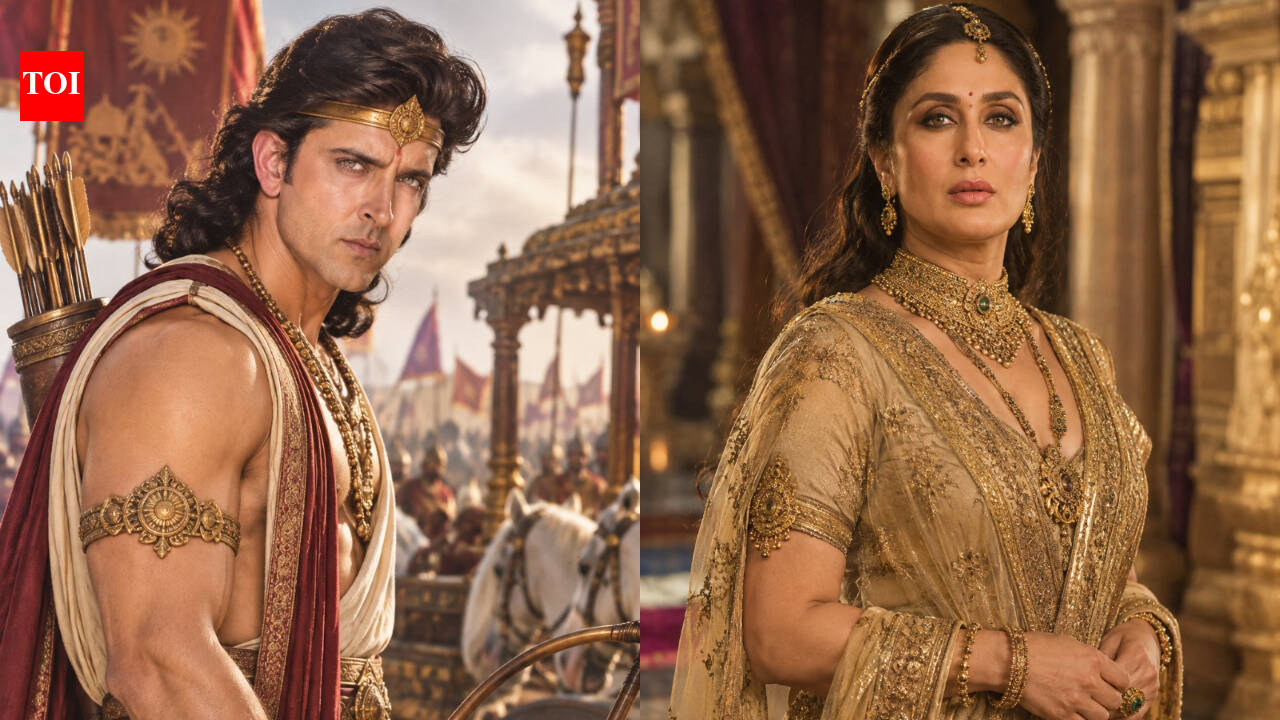
What if you could see yourself as a person from the Mahabharata?Not as a drawing or some heavily edited fantasy character, but as a proper portrait where you can still recognise yourself.That’s what AI image generators are making possible right now. Take a photograph from your phone, upload it and give the tool a detailed description of the kind of picture you want. The same face can suddenly appear in an old Indian palace, wearing traditional clothes and jewellery, with lamps, stone pillars and a completely different world in the background.The interesting part is that the result depends a lot on what you actually tell the AI.A vague instruction such as “make me look like I’m from the Mahabharata” can give you almost anything. You could end up with an outfit that looks like a television costume, a crown that makes no sense or enough jewellery to fill an entire locker. In some attempts, the face can change too.A little more detail usually helps.So, if you want to try the trend yourself, these prompts are a good starting point. You can change them depending on the photograph you’re using and the kind of picture you have in mind.Want a simple royal portrait? Try thisThis is probably the easiest one to start with. It doesn’t push the image too far in one direction.Prompt: “Take my uploaded photo and show me what I could have looked like during the Mahabharata era. Keep my face and features as close to the original photograph as possible. Dress me in traditional ancient Indian clothing with gold jewellery and a traditional hairstyle. Put me inside a large old Indian palace with stone pillars and oil lamps. The picture should look realistic, with warm light and natural-looking skin. I should look like a real person from that period, not someone dressed up for a costume party.”If you want the queen treatmentThis one is more elaborate. Use a clear photograph where your face is properly visible.Prompt: “Use my photograph to create a portrait of me as a royal woman living during the Mahabharata era. Do not change my face, skin tone or recognisable features. Give me a traditional silk drape inspired by ancient Indian royal clothing and add gold jewellery such as a maang tikka, necklaces, earrings, bangles and a waist belt. Keep the hairstyle traditional. The setting should be a royal palace with stone pillars, lamps and rich fabrics. Make the jewellery detailed but believable. Keep the photograph realistic rather than making it look like a fantasy character.”Prefer a warrior look?Then leave the palace behind.Prompt: “Use my uploaded photograph and show me as a warrior prince from the Mahabharata era. Keep my face recognisable and do not change my natural features. Dress me in traditional royal clothing with a dhoti-style drape, embroidered fabric, antique gold jewellery, armlets and a traditional crown or headpiece. Put a chariot and horses behind me, with warriors in the distance. Set the scene on an ancient Indian battlefield at sunset. Make it look like a real cinematic photograph. Do not make the clothes look like a modern film costume.”Something quieter might work betterNot every AI picture needs a battlefield, a horse or a palace full of people. A simple portrait can sometimes look much more convincing.Prompt: “Turn my uploaded photograph into a realistic portrait of me as a member of an ancient Indian royal family during the Mahabharata era. Keep my face and expression unchanged. Change the clothes, jewellery and hairstyle to suit the period. Put me inside an old royal palace with carved sandstone pillars, traditional lamps and rich fabrics. Use soft light and muted ivory, gold and deep red shades. Keep the details natural and believable. Do not add anything modern.”For the full cinematic versionIf subtle isn’t really what you’re after, you can go bigger with the setting.Prompt: “Use my uploaded photograph to create an epic Mahabharata-inspired portrait while keeping my face recognisable. Dress me in traditional ancient Indian royal clothing and detailed gold ornaments. Place me in a grand palace or a beautiful royal garden with traditional architecture, flowering trees and oil lamps. Give the scene warm evening light. It should feel like a frame from a large Indian historical film, but the people, clothing and surroundings should still look real. Avoid a cartoon or fantasy style.”You can keep correcting the pictureAnd this is where the AI part gets a little easier.The first image may look nothing like what you had in your head. That doesn’t necessarily mean the prompt has failed.Maybe the face is perfect but the jewellery is too heavy. Maybe the outfit looks too modern. Or perhaps the palace in the background is so elaborate that it takes attention away from you.Just ask for that one thing to be changed.For example: “Keep my face and clothes unchanged, but reduce the jewellery.”Or: “Keep the same person and outfit but change the background to a simple palace courtyard.”You can also tell it to make the clothing less elaborate, change the lighting or remove anything that looks too modern.It’s basically a bit of back and forth until you get a picture you actually like.And that’s probably the nicest thing about playing around with these images. You start with an ordinary photograph that’s been sitting in your camera roll and end up with something completely different. For a few minutes, at least, you get to imagine what your life might have looked like in another time.Get the latest movie news, reviews, and celebrity updates. Download the TOI App.
This text was published by bing.com and written by Trending Desk. It is reproduced here with attribution so you can read it in full; the rights remain with the publisher. Read it at the source ↗
The headline, key points and digest above were generated by Digest AI's editorial model from the linked sources. Automated summaries can contain errors: the sources are the record. Spotted a mistake? Tell us.
More in Agents & Tools
All →- IBM & NASA Open Source Lunar Foundation Model · 1 src
- litelm releases lightweight LiteLLM alternative with 2,900 lines of code · 1 src
- Skild AI launches S1 foundation model that learns robot tasks from a single video · 2 src
- OpenRouter's automatic fallbacks can cause inconsistent AI model behavior · 1 src
- OpenAI launches Agents API in public beta, exposing Codex infrastructure to developers · 8 src
Comments
via GitHub Discussions