How to Turn a Python Script Into an AI Agent
The guide uses a simple website-monitoring script as a case study, showing how to expose standard Python functions as tools via the @functiontool decorator. Once defined, an LLM can decide when to call these functions, what arguments to pass, and how to interpret the results, removing the need for rigid, pre-written logic for multi-step tasks.
Key points
- Tutorial demonstrates converting Python functions into AI agent tools using the OpenAI Agents SDK.
- The example uses the model gpt-5.6-luna to automate website monitoring and response time comparison.
- The @functiontool decorator automatically converts Python function signatures into JSON schemas for the model.
The tutorial walks through installing the SDK, defining the agent with the model gpt-5.6-luna, and running a query to compare response times across multiple websites. It explains that the Runner manages the loop between the model and the tools, allowing the agent to iterate until it has enough information to answer. The author notes that this pattern applies to other automation tasks, such as CSV analysis, server monitoring, and log investigation, where the agent orchestrates existing Python functions.
The piece highlights that cheaper models like GPT-5.6 Luna make running such agentic systems more affordable. The author, Abid Ali Awan, emphasizes that the core concept is giving the model a goal and the right tools, letting it handle the decision-making process rather than encoding every step in Python code.
How to Turn a Python Script Into an AI Agent
KDnuggets · 21 September 2026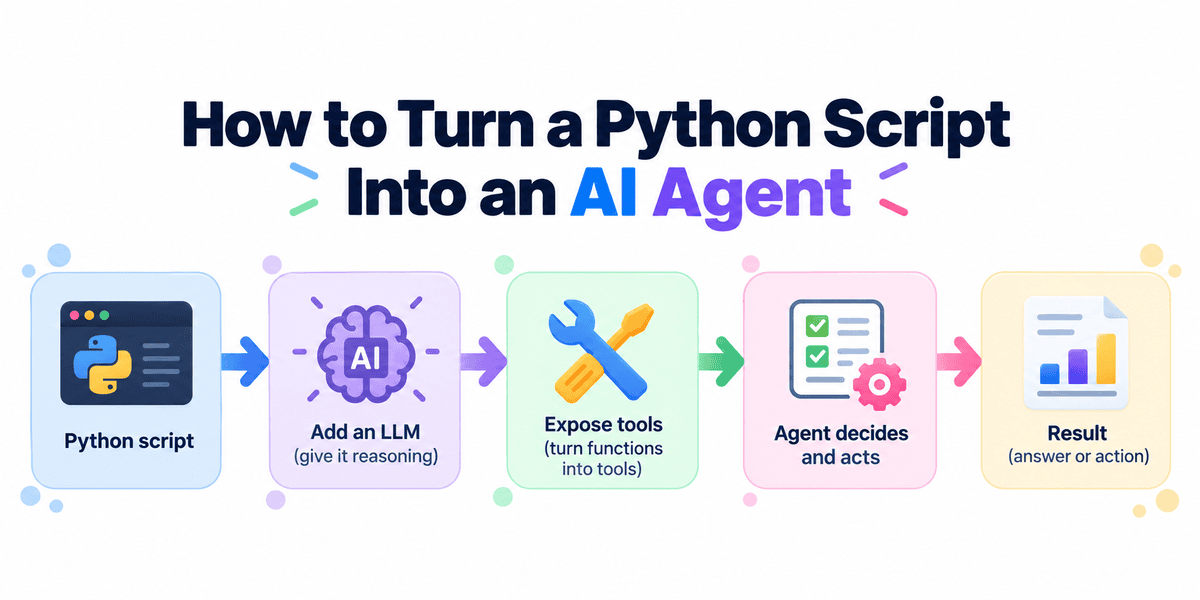
How to Turn a Python Script Into an AI Agent
Learn how to build a Python AI agent with the OpenAI Agents SDK, using tool calling and function tools to automate multi-step workflows.
You do not need to rewrite your Python applications to start using AI agents.
If your script already contains useful functions, you can expose those functions as tools and let an LLM decide when to call them, what arguments to provide, and how to use their outputs.
In this tutorial, we will take a simple website-monitoring script and turn it into an AI agent using the OpenAI Agents SDK.
Starting With a Normal Python Script
Before building an AI agent, let's start with a normal Python program.
Suppose we want to check whether a website is responding and measure how long the request takes:
from time import perf_counter
import requests
def check_website(url: str) -> str:
    start = perf_counter()
    try:
        response = requests.get(url, timeout=10)
        latency = perf_counter() - start
        return (
            f"{url}\n"
            f"Status: {response.status_code}\n"
            f"Response time: {latency:.2f}s"
        )
    except requests.RequestException as error:
        return f"{url}\nError: {error}"
print(check_website("https://www.python.org"))
Output:
https://www.python.org
Status: 200
Response time: 0.99s
The script does exactly what we programmed it to do: send an HTTP request, collect the status code, measure the response time, and return the result.
This is useful, but the workflow is completely fixed:
If we want to check five websites, compare their response times, or determine which one appears unhealthy, we need to write that logic ourselves.
This is where an AI agent changes the workflow.
Instead of encoding every decision in Python, we can expose check_website() as a tool and give an AI model a goal. The model can then decide when to call the tool, which URL to check, how many times to use it, and what to do with the results.
Step 1: Installing the Agents SDK
First, set up a Python project and install the packages we need to build and run the agent.
Create a new project:
mkdir website-agent
cd website-agent
uv init
uv add openai-agents requests
Or use pip:
pip install openai-agents requests
Set your OpenAI API key:
export OPENAI_API_KEY="your-api-key"
The Agents SDK provides a lightweight runtime for agents, tools, handoffs, sessions, and tracing.
Step 2: Turning the Python Function Into a Tool
Next, expose our existing Python function as a tool that the model can choose to call.
We can keep almost all of our existing function.
The main change is adding @function_tool:
from time import perf_counter
import requests
from agents import function_tool
@function_tool
def check_website(url: str) -> str:
   """Check a website's HTTP status and response time."""
   start = perf_counter()
   try:
       response = requests.get(url, timeout=10)
       latency = perf_counter() - start
       return (
           f"URL: {url}\n"
           f"Status: {response.status_code}\n"
           f"Response time: {latency:.2f}s"
       )
   except requests.RequestException as error:
       return f"URL: {url}\nError: {error}"
The OpenAI Agents SDK automatically converts the function signature into the JSON schema required by the model. It also uses the function name and docstring to describe the tool.
We do not need to manually create a tool schema.
Step 3: Creating the Agent
Now, create an Agent, define what it should do, and give it access to our check_website() tool.
from agents import Agent, Runner
agent = Agent(
   name="Website Monitor",
   model="gpt-5.6-luna",
   instructions="""
   Monitor websites using the available tool.
   Compare results and explain problems clearly.
   """,
   tools=[check_website],
)
Run the agent:
result = Runner.run_sync(
   agent,
   "Check python.org, github.com, and openai.com. "
   "Which one has the slowest response?"
)
print(result.final_output)
Output:
python.org is the slowest, responding in **1.59 seconds**.
- github.com: 0.83s
- openai.com: 0.49s
All returned HTTP 200.
Previously, we would have needed to write the loop and comparison logic ourselves:
for url in urls:
    check_website(url)
Now the model interprets the request, calls check_website() for the three websites, receives the results, compares them, and produces the answer.
How the Agent Loop Works
Behind the scenes, the Runner manages the interaction between the model and the tools.
Conceptually, the loop looks like this:
If the model needs more information, it can call the tool again. The loop continues until it has enough information to produce a final response.
This is what makes the workflow agentic. Instead of following a fixed sequence written entirely in Python, the model decides which actions to take based on the request and the results it receives.
Other Python Scripts You Can Turn Into Agents
The same pattern works with almost any existing Python automation. You keep the Python functions that do the actual work and let the agent decide which functions to call and how to combine the results.
For example:
- CSV analyzer: Functions filter rows, calculate metrics, and find trends. The agent answers natural-language questions about the data.
- Server monitor: Functions check CPU, memory, disk, and processes. The agent investigates why a server looks unhealthy.
- Log analyzer: Functions search logs, count errors, and extract events. The agent investigates incidents and summarizes what happened.
- API automation: Functions fetch data, update records, or create reports. The agent decides which operations are needed and in what order.
With the OpenAI Agents SDK, you can expose existing Python functions with @function_tool and add them to the agent's tools list.
The Python code still performs the work; the agent adds natural-language understanding, tool selection, and orchestration.
Final Thoughts
Agentic AI is becoming a practical way to automate workflows, with more companies using agents to handle multi-step tasks instead of relying on fixed scripts.
At the same time, cheaper models such as GPT-5.6 Luna make it much more affordable to run tool-using and even multi-agent systems at scale.
In this guide, we started with a normal Python function, turned it into a tool, connected it to an agent, and let the Runner manage the decision-making loop.
That is the core idea behind agentic applications: give the model a goal and the right tools, then let it decide how to complete the task.
Abid Ali Awan (@1abidaliawan) is a certified data scientist professional who loves building machine learning models. Currently, he is focusing on content creation and writing technical blogs on machine learning and data science technologies. Abid holds a Master's degree in technology management and a bachelor's degree in telecommunication engineering. His vision is to build an AI product using a graph neural network for students struggling with mental illness.
This text was published by KDnuggets and written by Abid Ali Awan. It is reproduced here with attribution so you can read it in full; the rights remain with the publisher. Read it at the source ↗
The headline, key points and digest above were generated by Digest AI's editorial model from the linked sources. Automated summaries can contain errors: the sources are the record. Spotted a mistake? Tell us.
More in Agents & Tools
All →- Amazon blocks Meta’s Muse AI agent from shopping on its site · 3 src
- Agent Name Service enables sub-millisecond offline verification of AI agents · 1 src
- TypeSafe AI releases decision‑making model Jev on September 15, 2026 · 9 src
- AWS and Hugging Face release six open-source agent skills for sagemaker deployment · 2 src
- Z.ai apologizes after developers say its ZCode tool silently uploaded data · 1 src
Comments
via GitHub Discussions