Opinion: Anthropic and OpenAI adopt opposite prompt styles in 2026
At the start of 2026 Anthropic and OpenAI each refreshed their official prompt‑writing guides, but the recommendations now point in opposite directions. Anthropic’s guide for Claude tells users to be “more specifically,” spelling out what, how, and for whom the output should be, because the latest Claude models “no longer guess” and act faithfully to the exact wording. OpenAI’s guide for…
Key points
- Anthropic’s 2026 guide tells Claude users to write “more specifically” for higher accuracy.
- OpenAI’s 2026 guide advises ChatGPT users to give only the goal and avoid excessive detail.
- Both guides still require stating the output, providing one example, and specifying reader and purpose.
Just the results for ChatGPT, be specific for Claude. The story of how the prompt styles of the two companies became polar opposites in 2026
note.com · 20 September 2026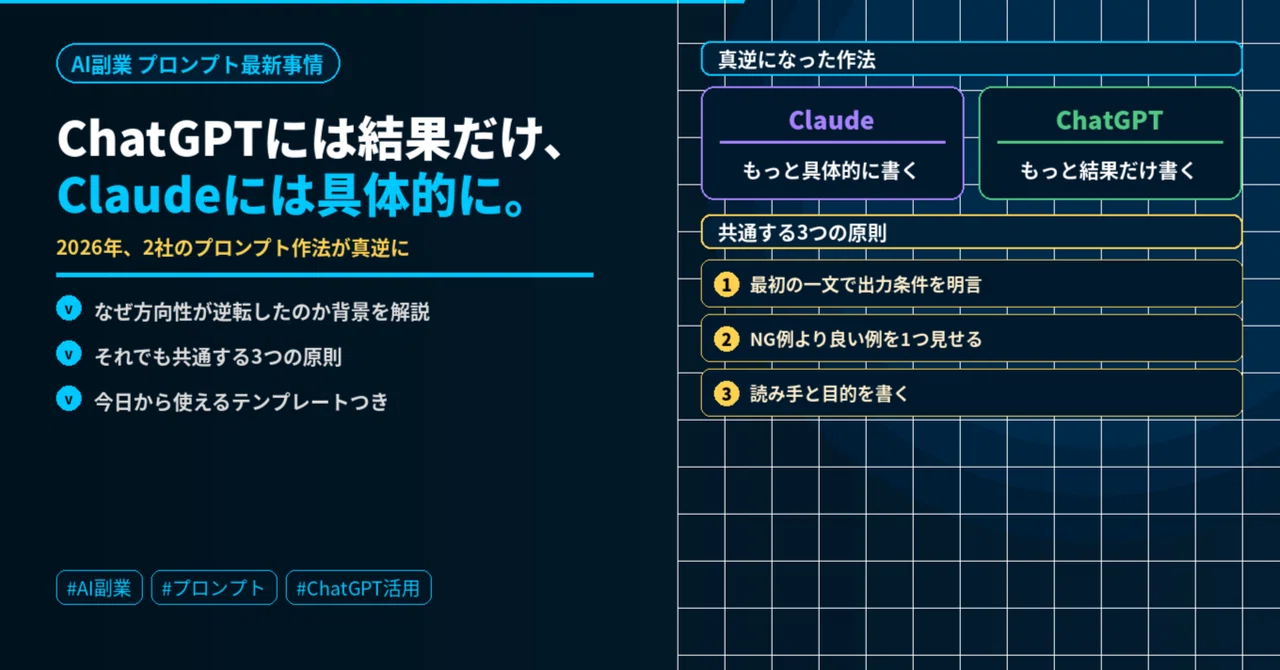
Just the results for ChatGPT, be specific for Claude. The story of how the prompt styles of the two companies became polar opposites in 2026
“Lately, even when I give instructions to AI, things just don't seem to work out.”
Have you ever felt that way? You used to get satisfying answers with the same way of asking, but lately, you get answers that are slightly off. It’s not that your usage skills have declined.
In fact, since the beginning of 2026, Anthropic and OpenAI have each updated their official prompt guides, and their directions have become polar opposites.
Even though it’s the same “how to write instructions for AI,” opposite approaches are recommended for Claude and ChatGPT—if you don’t know this and give instructions to both AIs in the same tone, it means that one of them is definitely not performing to its full potential.
What you will learn in this article:
- Why the prompt styles of the two companies became polar opposites
- The difference between writing styles that work for Claude and those that work for ChatGPT
- Three principles that still remain common
- Instruction templates you can use starting today
What became “polar opposite”
To put it simply, it’s like this.
For Claude, write “more specifically.” For ChatGPT, write “only the results.”
In Anthropic’s official guide, it is explained that the latest models “no longer guess. They only act exactly as written.” Previous models had parts where they would guess and supplement your intent even with somewhat vague instructions, but the latest models have a stronger nature of “acting faithfully as written.” In other words, it has become necessary to clearly write down in your own words the parts that were previously guessed for you.
On the other hand, OpenAI’s official guide states: “The model has started to make its own judgments. Writing too much detail is counterproductive.” This is the exact opposite, pointing out that specifying steps in too much detail can actually hinder the AI’s autonomous judgment and potentially reduce accuracy.
In other words—
Claude: The more specifically you write “what, how, and for whom,” the higher the accuracy. ChatGPT: The accuracy increases if you only convey the goal clearly and leave the detailed judgments to it.
Even though it is the same act of “writing a prompt,” the direction of the correct answer has become reversed. People who felt “it’s not working as well as before” were caught in the timing when both companies made this shift simultaneously.
Why did this happen?
In the background, there are differences in the philosophies of model development between the two companies.
Anthropic is refining its models in a direction that emphasizes “acting accurately as intended.” This is an evolution suited for user segments that demand reproducibility in business and faithful responses to complex instructions. However, as a trade-off, the degree of “reading between the lines” for vague instructions has decreased.
OpenAI is evolving in a direction that emphasizes "understanding human intent and acting autonomously." This evolution is suited for users who find giving detailed instructions tedious or for situations where you want to leave things to the AI to some extent. However, as a trade-off, overly detailed instructions can easily become noise.
This is not a matter of which is better. It is simply that as their design philosophies evolved in different directions, the "correct" way to prompt has diverged.
Three principles that remain common
Even though their directions are polar opposites, if you compare the guides from both companies, there are actually three points that should be covered in common. As long as you follow these, the results will be stable with either AI.
Principle 1: Clearly state "what you want output" in the first sentence
"Summarize it nicely," "Please handle this," or "Do it however"—these kinds of vague requests cause a drop in accuracy for both AIs.
Instead, be conscious of packing the character count, format, and order into the first sentence.
悪い例:「いい感じにまとめて。読みやすくして。短めで」
良い例:「400字以内、短い段落3つ、冒頭に結論を書いてください」
Principle 2: Show one good example rather than listing negative examples
Rather than writing out a long list of "don't do this," showing one concrete example of "this is the ideal feel" tends to increase accuracy for both companies.
悪い例:「硬すぎず、砕けすぎず、専門用語は使わず、長すぎず…」
良い例:「こんなトーンで書いてください:
『新サービスXは導入1か月で問い合わせを2倍にした実績があります』
のような、事実ベースで簡潔な一文」
Principle 3: Write the reader and the purpose
Just by adding one sentence about "who it is for" and "what it is for," the tone and structure will become accurate all at once.
「読み手は支店長。来週の会議で承認をもらうのが目的です」
With just this one sentence, the AI will start to construct its response in a direction that says, "Let's make this a persuasive and concise piece of writing."
A template you can use starting today
Let's apply this to an actual situation. Take the request, "I want to create materials for a new service proposal to use at next week's branch meeting," as an example.
Old prompt (vague):
いい感じにまとめて。読みやすくして。短めで。
New prompt (reflecting the principles common to both companies):
400字以内、短い段落3つ、冒頭に結論。
読み手は支店長で、来週の会議で承認をもらうのが目的。
重要な箇所は太字にしてください。
良い例は「新サービスXは導入1か月で問い合わせを2倍にした実績がある」
のような、事実ベースの簡潔な一文です。
When sending this new prompt to Claude, you add even more details. The more specific conditions you add, such as "the steps to introduction in 3 steps" or "no need to include cost estimates," the higher the accuracy becomes.
On the other hand, when sending it to ChatGPT, this is sufficient as is. Leaving the judgment of details to the AI actually results in a more natural finish.
Practical application of using them differently as a side-hustle writer
This "polar opposite style" can also be applied to techniques introduced in previous articles, such as Perplexity's primary information gathering or the AI persona debate method.
When to use Claude (situations requiring specific details):
- Finalizing the text of an article
- Structuring content with complex combined conditions
- Tasks involving the reflection of detailed client requests
When to use ChatGPT (situations where you should only convey the result):
- Brainstorming and idea generation
- Creating a rough draft or foundation
- Rough requests like "just get it into some kind of shape"
Just by being conscious of this distinction, your interactions with AI, which may have felt "somehow not quite right" until now, will become surprisingly smooth.
Common Questions
Q. Are the prompt templates I've saved so far no longer usable?
There is no need to recreate everything. In most cases, you can continue to use your existing templates as they are by simply adding the first sentence (character count, format, and reader information).
Q. If I write "make it look good," will it stop answering me?
It will still provide an answer, but the results are simply more likely to be vague than before. I recommend trying to be conscious of principles 1 through 3 for one week first.
Summary: One thing to do today
The prompt styles for Claude and ChatGPT have evolved in opposite directions as of 2026. Give specifics to Claude, and only the result to ChatGPT. Even so, the common correct approach is to pack the "character count, format, and reader" into the very first sentence.
What to do today: Next time you ask the AI for something, try including the "character count," "format," and "reader" in the first sentence.
This alone will change the quality of the answers you get from the AI by one level. Depending on whether you are using Claude or ChatGPT, simply adding one extra step (being specific or leaving it to the AI) should resolve those "somehow not quite right" feelings you've had until now.
If you found this article helpful, I would be encouraged if you could press the "Like" button. If you follow me, I will deliver the latest information on AI side hustles.
① How the credibility of my articles improved by using ChatGPT and Perplexity for "different roles"
→ https://note.com/ai_do0419/n/n7d70005d5b14
② If you're starting a side hustle, should you use GPT-5.5 or Claude Sonnet 4.6? The real answer I found after using them for a month
→ https://note.com/ai_do0419/n/n7a34c3f39168
③ Is it true that "prompt engineering is dead"? In 2026, the people who stand out with AI are those who possess the "quality of inquiry"
This text was published by note.com and written by もちまる@副業. It is reproduced here with attribution so you can read it in full; the rights remain with the publisher. Read it at the source ↗
The headline, key points and digest above were generated by Digest AI's editorial model from the linked sources. Automated summaries can contain errors: the sources are the record. Spotted a mistake? Tell us.
More in Marketing & Small Business
All →- Opinion: CrowdWorks Academy’s beginner Claude Code course teaches non‑engineers AI file automation · 1 src
- AWS and Salesforce expand partnership to embed AI agents and CRM data for small businesses · 1 src
- Opinion: limit ChatGPT to three options and stop at 80% to keep work fast · 2 src
- Opinion: Beginner finds ChatGPT useful for blogging and affiliate marketing · 1 src
- Opinion: using ChatGPT for invoice tallies often yields close but inaccurate results · 1 src
Comments
via GitHub Discussions