Opinion: Using ChatGPT as an entrance and Notion as memory organizes knowledge
A real estate practitioner in Kanagawa Ward outlines an operational workflow that uses ChatGPT as an initial thinking space and Notion as a persistent knowledge repository. Rather than leaving brainstorming sessions trapped in chat logs or manually copying notes between applications, the author uses a ChatGPT integration plugin to export generated ideas directly into Notion.
What you can do with it
AI at Work →Brainstorms ideas in conversation and exports organized notes directly into Notion pages via an integration plugin.
- Who for
- marketers, founders and operations
- Cost
- Cost not stated
- Effort
- minutes
Use it for
- Organizing brainstorming sessions into Notion pages
- Drafting article outlines during chat conversations
- Routing discussion notes to team workspaces
Watch out The integration handles text smoothly, but cannot directly transfer images from ChatGPT into Notion.
Key points from the news
- A practitioner connects ChatGPT to Notion using a plugin, saving ideas directly to Notion pages during conversational brainstorming sessions.
- Direct Notion AI usage is reserved for pre-planned documentation, while ChatGPT serves as an exploratory entrance for unstructured thoughts.
- The integration currently handles text transfers, but technical limits prevent sending images from ChatGPT directly into Notion.
The author distinguishes this workflow from tools like NotebookLM. While NotebookLM processes existing documents, the ChatGPT-to-Notion integration captures net-new ideas that emerge during open-ended dialogue. When the intent is strictly to record structured notes from the start, the author uses Notion AI directly. When an idea requires exploratory back-and-forth, ChatGPT serves as the starting point before pushing text to Notion. The author notes that while text transfers smoothly, limitations remain, such as an inability to pass images into Notion directly.
This setup illustrates a broader shift in how software is navigated. Instead of opening separate applications for storage, drafting, and file handling, conversational AI serves as a central entry point that routes data to platforms like Notion and Google Drive.
Using ChatGPT as an 'Entrance' and Notion as 'Memory' | How a Real Estate Company in Kanagawa Ward Strong in AI/IT Uses AI
note.com · 19 September 2026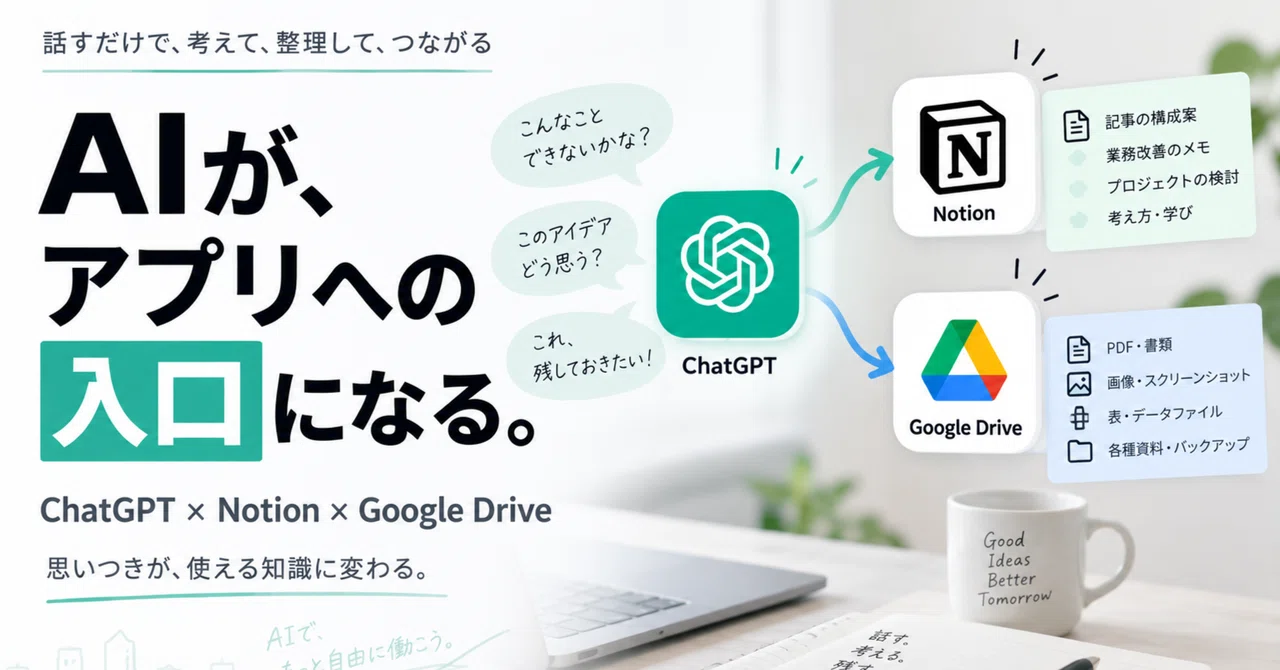
Using ChatGPT as an 'Entrance' and Notion as 'Memory' | How a Real Estate Company in Kanagawa Ward Strong in AI/IT Uses AI
I talk to ChatGPT almost every day.
I consult it about work, think through article structures, and throw ideas at it as they come to me.
Recently, when I think of something, I find myself talking to the AI first before I even try to summarize it in writing myself.
This is actually quite convenient.
Even if things aren't organized in my head yet, I can just talk it out as is.
"I'm thinking about this, what do you think?"
Starting with something like that, ChatGPT will ask questions or offer different perspectives, helping me organize my thoughts together with it.
However, there was one thing that bothered me.
What do you do with that conversation afterward?
There is quite a lot in my conversations with ChatGPT that I want to keep.
If you are just using ChatGPT as a substitute for a search engine, it's not much of an issue.
But once you start using it as a sounding board, the situation changes.
While talking about work,
"This could be used within the company too"
sometimes an operational method solidifies.
While talking about an article,
"This angle could be used for another article too"
sometimes an idea emerges.
Even if the conversation didn't start with the intention of completing something from the beginning, information that makes you think "I want to keep this" is born in the middle of the talk.
Of course, conversation history remains in ChatGPT.
However, I felt it was a bit wrong to keep all the knowledge important to me solely within chat history.
A conversation is just a conversation.
I want to accumulate the knowledge I want to keep as knowledge to be preserved.
That is why I use Notion.
I was originally talking directly to Notion AI.
I use Notion quite a lot on a daily basis.
And recently, when I want to save something in Notion, I have started talking directly to Notion AI more often than writing and saving text myself.
For example,
I say, 'I thought about this today. Please organize and save it because I want to use it later.'
I say that.
There is no need to organize it into clean text before inputting it.
Even if I digress a little while talking, the AI organizes the content for me.
From the beginning,
'I want to save this in Notion'
If the information is already decided, this method does not cause any particular trouble.
So for a while,
'I will talk to Notion AI about what to save.'
That was how I was using it.
The trigger was Google Drive
However, the way I use ChatGPT has been changing little by little.
It has become able to connect to Google Drive and handle files.
While using that, I suddenly thought of something.
'If it can connect to Google Drive, couldn't it also work with Notion?'
So, I looked for a ChatGPT plugin.
I found one.
It can connect to Notion.
In that case, if information I want to keep comes up while I'm talking with ChatGPT, I can just pass it directly to Notion.
When I actually connected it and started using it, it felt more natural than I had expected.
Think with ChatGPT, and save it directly to Notion
For example, I sometimes consult with ChatGPT about my note articles.
At first, it's quite rough.
'I'm writing an AI article this week, do you have any ideas?'
It starts with something like that.
From there,
'That's not quite right.'
'Wouldn't this angle be more interesting?'
'In that case, I'm actually using it like this.'
We continue the conversation like that.
Then, what started as just a random thought gradually becomes the theme of an article.
And in the middle of it,
'I want to use this later'
becomes the state of mind.
In the past, I would copy the content, open Notion, create a new page, and paste it.
Or I would think 'I'll do it later' and just forget about it.
Now, I just ask ChatGPT,
'Save this to Notion'
and it's done.
From the thinking stage to the saving stage, the conversation remains uninterrupted.
This difference is quite significant.
From ChatGPT to Notion. What you come up with turns into usable knowledge.
- Diagram of 'Come up with an idea/Talk -> Think with ChatGPT -> Value emerges -> Save to Notion -> Reuse later'
Should I use Notion AI or ChatGPT?
Having done this much,
'So, isn't there no need to talk directly to Notion AI?'
I also think.
But for now, I use both.
The distinction is quite simple.
If the goal is to save it to Notion from the start, use Notion AI.
If you are consulting or brainstorming with ChatGPT and decide you want to save it halfway through, go from ChatGPT to Notion.
It is not a question of which one is superior.
You should just change your entrance depending on where you are at that moment.
If you are in the middle of working in Notion, you should just talk to Notion AI directly.
If you are in the middle of talking to ChatGPT, you should just connect it to Notion without going out of your way to switch to another app.
Lately, I think that rather than 'which AI to use,'
whether you can proceed to the next process directly from where you are now
is more important.
It is a slightly different direction from NotebookLM
When it comes to AI and storing information, there are services like NotebookLM.
However, the flow of information is slightly different from what I am doing this time.
NotebookLM is mainly used by having the AI read prepared materials and then asking questions about or organizing that content.
In other words,
Materials → AI
is the flow.
On the other hand, the way I am using ChatGPT and Notion this time follows the flow of
Conversation with AI → Information is created → Save what you want to keep to Notion
is the flow.
Instead of having the AI read information that already exists, you are accumulating things born in the middle of thinking together with the AI as knowledge.
They may seem similar, but the direction in which information flows is different.
Of course, it is not yet capable of doing everything
That said, it is not perfect at this moment.
When actually using it, text is quite easy to handle.
On the other hand, there are still limitations, such as images not being able to be sent to Notion in the same way.
AI has become an 'entrance to apps'
This was the most interesting part of using it this way.
Previously, I would choose an app every time I did some work.
If I wanted to save it to Notion, I would open Notion.
If I wanted to handle files, I would open Google Drive.
I would open each app and operate each screen.
But as AI begins to connect with external services, this order is changing.
First, I talk to ChatGPT.
I think there.
If it is knowledge I want to keep, I send it to Notion.
If it is a file, I send it to Google Drive.
In other words, ChatGPT is
starting to become not only a place to think, but also an entrance to connect to other services
as well.
AI becomes the entrance to apps.
- A diagram showing 'You → ChatGPT → Notion/Google Drive' and 'Talk → Think → Save → Reuse'
This does not mean that Notion or Google Drive will become unnecessary.
Actually, it is the opposite.
I believe each of them will continue to be important as places to store information and files.
What is starting to change is whether humans really need to access each app directly and operate everything themselves part.
AI steps in between them.
I think this is quite a significant change.
From 'Which app to use' to 'How to make it flow'
Previously, every time I found a new tool,
I would think,
'What should I use this for?'
But recently, my way of thinking has changed a little.
What is important is not the app itself, but
Entrance → Thinking → Organizing → Saving → Reusing
the flow of information itself.
If it were me now,
I would use ChatGPT or Notion AI as the entrance.
I think while brainstorming with ChatGPT.
I send the knowledge I want to keep to Notion.
I place files like images and PDFs in Google Drive.
When I need them, I retrieve and use them again.
There are still limitations, and I don't think this is the final form.
However, one thing has definitely changed.
Previously,
'I should save this to Notion'
'I should organize Google Drive'
I would think these things before opening each app.
Now, I talk to the AI first.
Deciding where to save it comes after that.
Personally, I find this change more interesting than the fact that AI has become smarter.
ChatGPT is gradually starting to shift from being someone you ask questions to an entrance to all the services I use.
I think from now on,
'not just which AI is the smartest, but how far my work is connected from that AI'
will also become an important criterion for choosing an AI.
This text was published by note.com and written by 横浜の不動産賃貸管理・マンション売却を最適化するnote by 田辺領平. It is reproduced here with attribution so you can read it in full; the rights remain with the publisher. Read it at the source ↗
The headline, key points and digest above were generated by Digest AI's editorial model from the linked sources. Automated summaries can contain errors: the sources are the record. Spotted a mistake? Tell us.
More in Marketing & Small Business
All →- AI Beauty Image Prompt Collection 36 offers 100 prompts for ChatGPT and Gemini · 6 src
- Opinion: Microsoft Copilot can help reclaim an hour a day with three simple tasks · 1 src
- Prompt chatgpt to ask for missing information to improve answer relevance · 1 src
- OpenAI tests ads inside ChatGPT as AI search grows · 1 src
- ChatGPT guide offers ways to avoid AI-like writing · 2 src
Comments
via GitHub Discussions